

- Services

Getting to know us
- Industries
Recent case study:
Oracle EBS Cloud Deployment
Consolidating and Migrating assets into Oracle Cloud Infrastructure.
.png?width=250&name=stonewater-logo%20(1).png)
Most Visited Pages
-
- Resources
DSP-Explorer acquires leading Oracle Applications Managed Services Provider, Claremont, to further extend its data management capabilities.

Resources
- Contact us
Why Microsoft Fabric Is Changing Business Intelligence
Contents
For many organisations, Power BI has been the centre of their analytics estate for years. As data volumes, sources and expectations grow, many are asking whether their reporting tool should also be their data platform. Microsoft Fabric offers a different approach, changing how businesses think about delivering BI.
What is Microsoft Fabric?
Microsoft Fabric is Microsoft's software-as-a-service (SaaS) analytics platform. It brings data engineering, data science and data analytics into a single environment, all sharing the same capacity, security and governance.
At its centre is OneLake, a single logical data lake built on Azure Data Lake Storage. Tabular data is stored in the open Delta Parquet format, so different engines, such as Spark, T-SQL and Power BI, can work with the same copy of the data rather than duplicating it.
Fabric offers many capabilities comparable to platforms such as Databricks and Snowflake. What sets it apart is its integration with the Microsoft ecosystem, particularly Power BI, Microsoft Entra ID and Microsoft 365. For organisations already invested in Microsoft technologies, this can make adoption considerably simpler. Migration still needs careful planning around architecture, skills, licensing and existing workloads.
Power BI and the Case for a Data Platform
Power BI is a mature and highly capable analytics platform, offering:
-
Large, compressed semantic models, particularly on Premium or Fabric capacity
-
Incremental refresh
-
Hundreds of Power Query connectors
-
Strong support for star-schema modelling
-
Git integration through Power BI Desktop projects
The challenge isn't what Power BI can do. It's what happens when Power BI ends up doing all the data engineering too. As a BI estate grows, familiar issues appear:
-
Duplicated logic. The same cleansing rules and business definitions are rebuilt across multiple semantic models, leading to inconsistent figures.
-
Heavy, fragile refreshes. Complex transformations over large or multiple sources can make refreshes slow and resource-intensive, especially where query folding is not possible.
-
Limited history. A semantic model reflects the source data at its last refresh. Preserving historical changes requires a persistent storage layer.
-
Data outside the model. Raw files, semi-structured API responses, and unstructured content such as documents and images need somewhere to live.
-
Fragmented operational control. Monitoring, testing and deployment are spread across many independently built reports.
Fabric addresses these issues by moving ingestion, transformation and storage upstream into a shared platform. Power BI can then focus on what it does best: modelling, visualisation and self-service analytics on trusted, well-structured data.
A Practical Architecture: The Medallion Pattern
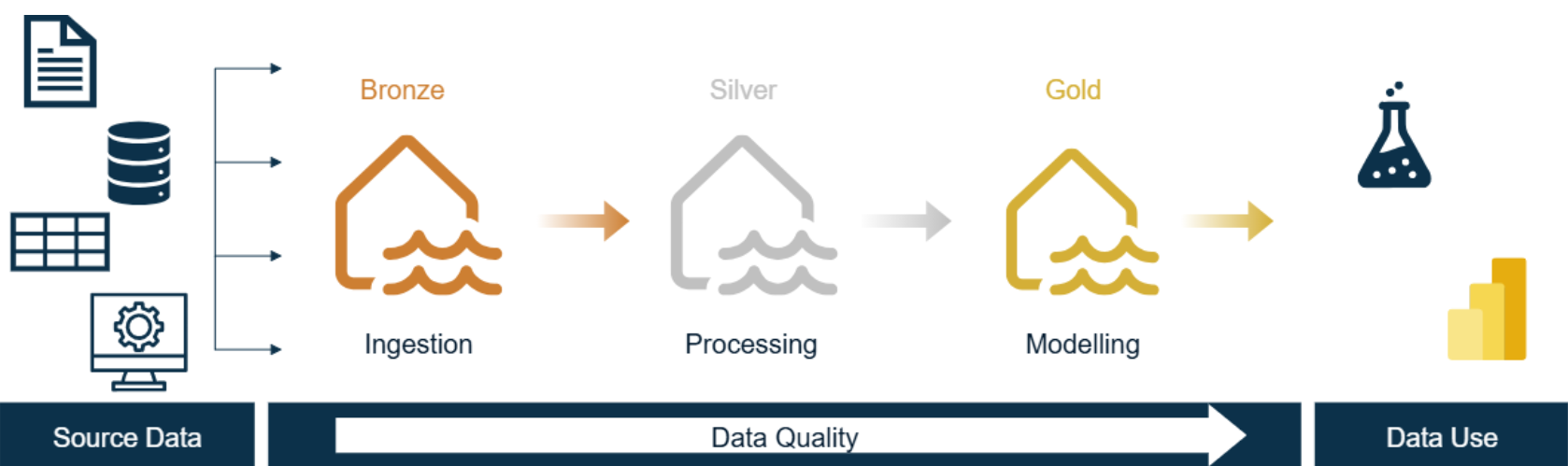 Medallion Architecture in Microsoft Fabric
A common way to organise a Fabric platform is the medallion architecture, which uses three layers: Bronze, Silver and Gold. It's a practical pattern, not a fixed rule. Some organisations combine layers, others add more, and some load mirrored data straight into a Warehouse. Whether each layer uses a Lakehouse or a Warehouse depends on your skills, workloads and requirements.
Bronze: Centralising Raw Data
The Bronze layer stores data as close as possible to how it arrives from source systems. Held in OneLake, it can accommodate large volumes of structured, semi-structured and unstructured data cost-effectively. It also provides a reliable record that can be reprocessed if business rules change.
Fabric offers several ingestion options:
| Option | Typical Use | Development Style |
| Pipelines and Copy job | Scheduled batch loads from databases, files and SaaS applications; orchestration | Low-code |
| Dataflow Gen2 | Power Query-based ingestion and light transformation | Low-code |
| Notebooks | APIs, custom logic and semi-structured data | Code (Python/PySpark) |
| Eventstream | Streaming data, e.g. Azure Event Hubs, IoT and change data capture | Low-code |
| Mirroring | Near real-time replication from supported databases such as Azure SQL Database, Snowflake and Cosmos DB | No-code |
| Shortcuts | Referencing data in ADLS, Amazon S3 or other OneLake locations without copying it | No-code |
The right choice depends on the source, volume, latency requirements and your team's skills. For a daily extract from the HubSpot API, for example, a notebook is often a good fit, particularly where pagination, authentication or nested JSON need custom handling. A pipeline may be sufficient for simpler cases.
Incremental loading, where only new or changed records are ingested, is supported through several routes: watermark patterns in pipelines and notebooks, incremental options in Copy job, and change replication through Mirroring. It needs to be designed deliberately, but it can significantly reduce load times and capacity consumption.
Silver: Reusable, Trusted Transformation
The Silver layer cleanses and conforms Bronze data, removing duplicates, correcting data types, applying business rules and combining related data from different sources. The results are typically stored as Delta tables in a Lakehouse.
Notebooks running on Apache Spark are a common choice here. Spark is a distributed engine that processes large datasets in parallel, and developers can work in PySpark, Spark SQL, Scala or R. Python notebooks without Spark suit smaller workloads, while Dataflow Gen2 and T-SQL offer alternatives for teams with different skill sets.
The key business benefit is reusability. Transformations are defined once and consumed by every downstream model and report, which gives you a single source of truth instead of conflicting definitions scattered across reports.
Incremental processing can also reduce processing time and cost by merging only new or changed records into Delta tables, rather than reprocessing the entire dataset.
Gold: Models Built for Analytics
The Gold layer shapes Silver data into analytical models, usually star schemas. These consist of fact tables recording business events and dimension tables describing them.
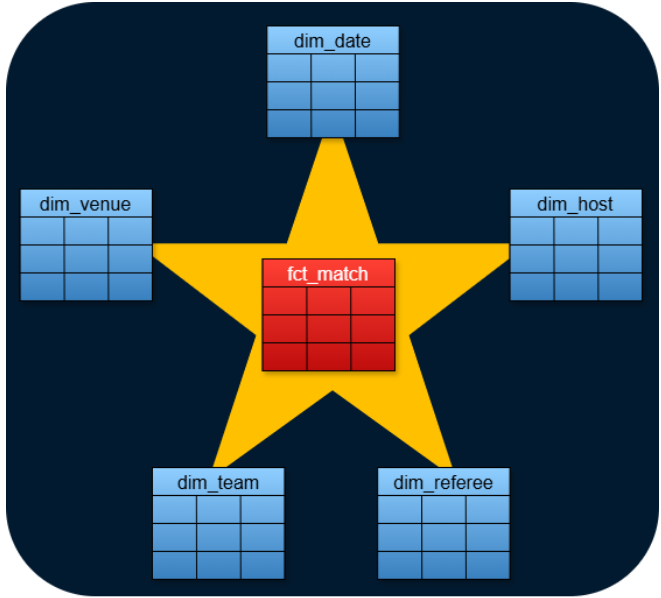 Star schema example: football matches represented using a fact table linked to related match dimensions
Gold models can be built in a Fabric Warehouse, which offers full T-SQL support, including stored procedures and multi-table transactions. They can also be built in a Lakehouse, which is queried through its read-only SQL analytics endpoint. Notebooks can work with both. Primary and foreign keys in Fabric Warehouse are not enforced, so data integrity is managed in the transformation logic, and relationships are defined in the Power BI semantic model.
This layer delivers several capabilities that are hard to sustain within reporting tools alone:
-
Conformed dimensions. For example, a single customer dimension mapped across CRM and finance systems lets you report across the whole business rather than one system at a time.
-
Slowly changing dimensions. These preserve history, such as creating a new record when a customer's address changes so reports can reflect the position at any point in time.
-
Ad hoc SQL access. Analysts can explore the same governed models that feed reports.
For Power BI, Direct Lake mode allows semantic models to read Delta tables directly from OneLake. This avoids large scheduled import refreshes and can offer performance close to Import mode. It is subject to capacity-based guardrails, and some scenarios fall back to DirectQuery, so Import and DirectQuery remain valid choices depending on the workload.
Operating the Platform
A reliable BI service depends on how well the platform is run, not just how it is built.
Monitoring and Alerting
The Monitoring hub provides a centralised view of pipeline, notebook and refresh activity. Pipelines can send alerts through Teams or Outlook, and Activator can trigger actions when defined data conditions are met. Together, these help teams identify and resolve pipeline and data quality issues early, and keep the relevant users informed.
Version Control and CI/CD
Fabric workspaces integrate with Git through Azure DevOps and GitHub. Deployment pipelines, REST APIs and tools such as the fabric-cicd library then support automated promotion between development, test and production environments. Item support is broad but still evolving, so it's worth validating your CI/CD approach early rather than assuming it will just work.
Capacity Optimisation
Fabric capacity is shared across workloads, and the Capacity Metrics app shows which items consume it and when. Teams can use this insight to optimise slow-running processes, schedule jobs sensibly and right-size their capacity. Fabric doesn't reduce costs on its own; savings come from good design, monitoring and ongoing optimisation.
Governance and Security
Access is managed through Microsoft Entra ID, workspace roles and item permissions. Row-level and column-level security are available in Warehouses and semantic models, with more granular OneLake-level controls emerging. Microsoft Purview adds sensitivity labels, data loss prevention policies and cataloguing, while Fabric's lineage, domains and endorsement features help users find data they can trust.
AI and Machine Learning
Data scientists can train and track models in notebooks using MLflow. Copilot, Fabric data agents and AI functions bring generative AI closer to business users, and curated data can be made available to third-party AI tools such as Claude. None of this is worth much if the underlying data is poor, which is why a well-governed Gold layer matters more than the AI layer sitting on top of it. Availability of some of these features also depends on capacity size and tenant settings.
Getting the Implementation Right
Fabric's benefits are not automatic. Performance, cost and productivity gains depend on sound architecture, sensible capacity sizing, suitable data volumes and disciplined engineering practices. Common pitfalls include:
-
Lifting and shifting existing Power BI logic without redesign
-
Under- or over-sizing capacity
-
Treating governance as an afterthought
-
Over-engineering solutions for straightforward requirements
How DSP Can Help
DSP is a specialist Microsoft data platform partner that helps organisations adopt Fabric. We can support you with:
-
Fabric readiness assessments and strategy
-
Designing dimensional models, platform architecture and data source integration
-
Migration from existing Power BI, SQL Server or Azure estates
-
ELT pipeline development
-
Power BI and generative AI integration
-
Governance, security, capacity optimisation, DevOps and CI/CD
Whether you are evaluating Fabric or already mid-migration, we can help you build a platform that fits your business rather than a one-size-fits-all template.
Conclusion
Power BI remains an excellent reporting and analytics platform. Fabric complements it by providing the wider data foundation that modern BI increasingly needs: centralised ingestion, reusable and scalable processing, and governed data models.
Get that foundation right, and reporting will be more consistent, delivery will be faster, and the data underneath will be genuinely ready for the Copilot and AI features Fabric is building on top of it.
Contact DSP to discuss how Microsoft Fabric could support your organisation.