

- Services

Getting to know us
- Industries
Recent case study:
Oracle EBS Cloud Deployment
Consolidating and Migrating assets into Oracle Cloud Infrastructure.

Most Visited Pages
-
- Resources
DSP-Explorer acquires leading Oracle Applications Managed Services Provider, Claremont, to further extend its data management capabilities.

Resources
- Contact us
Oracle APEX 26.2 in Practice: What's Changed and How to Test It
Contents
What's new in Oracle APEX 26.2?
-
APEXlang: Import individual pages and components.
-
AI enhancements: New provider APIs and improved AI agent capabilities.
-
Interactive Reports: Better search and AI-powered reporting.
-
Deep Data Security: Stronger database-level data access controls.
-
OCI authentication: Simplified credential management using managed identities.
-
Platform updates: Improvements to REST, OAuth, compatibility and exports.
Let's explore these changes in more detail.
Oracle's announcement lists what is in APEX 26.2. This blog explores what it changes day to day, where the limits are, and what we would test first. The short version: developers get the most from file-level import, architects should look hard at Deep Data Security, and report users get a noticeably better Interactive Report.
Availability: 26.2 is out now for on-premises installs. Autonomous AI Database and wider OCI availability follow in the coming weeks.
Who should care about what
| If you are... | The change to look at first | Why |
| A developer | APEXlang file-level import | Import one page or component instead of the whole app |
| An architect or security lead | Deep Data Security integration | Data rules enforced in the database, including for AI agents |
| Building AI features | Reasoning Effort and new provider APIs | Control over speed, cost and depth of agent answers |
| Supporting report users | Interactive Report refresh | Better filtering, plus AI commands that do not always need a model |
| Running on OCI | Managed identities for Web Credentials | No personal API keys stored in the app |
Source control stops being all-or-nothing
A scenario: Two developers share one order-management app. One is fixing a validation on the Orders page. The other is restyling a shared navigation component. Until now, getting an APEXlang change back into the workspace meant importing the whole application, so each developer risked overwriting the other's work. In 26.2, each edits just their own .apx file and imports only that.
How it works: In the SQL Developer extension for VS Code, an Import File button now sits next to Import Application. SQLcl can also import selected files. Two conditions catch people out: the button only appears when you are connected to a database running APEX 26.2 or later, and the app must have been exported with 26.2 or later; an app exported on 26.1 needs re-exporting first.
The limits: Oracle positions this for the edit-and-test loop in a shared development environment, not as a deployment tool, so we would not use it to push changes into production. It is not available in App Builder, and is aimed at changes to existing pages and shared components, so check Oracle's FAQ before relying on it for themes, templates or plug-ins.
Our view: Pair it with a validation step before every import. SQLcl already offers apex validate and apex import commands for APEXlang folders (check the exact syntax against your SQLcl version). Together with Git, this finally makes small, reviewable APEX changes realistic. If you are new to APEXlang, start with our 'Introduction to APEXlang' blog.
AI agents: spending reasoning where it is worth it
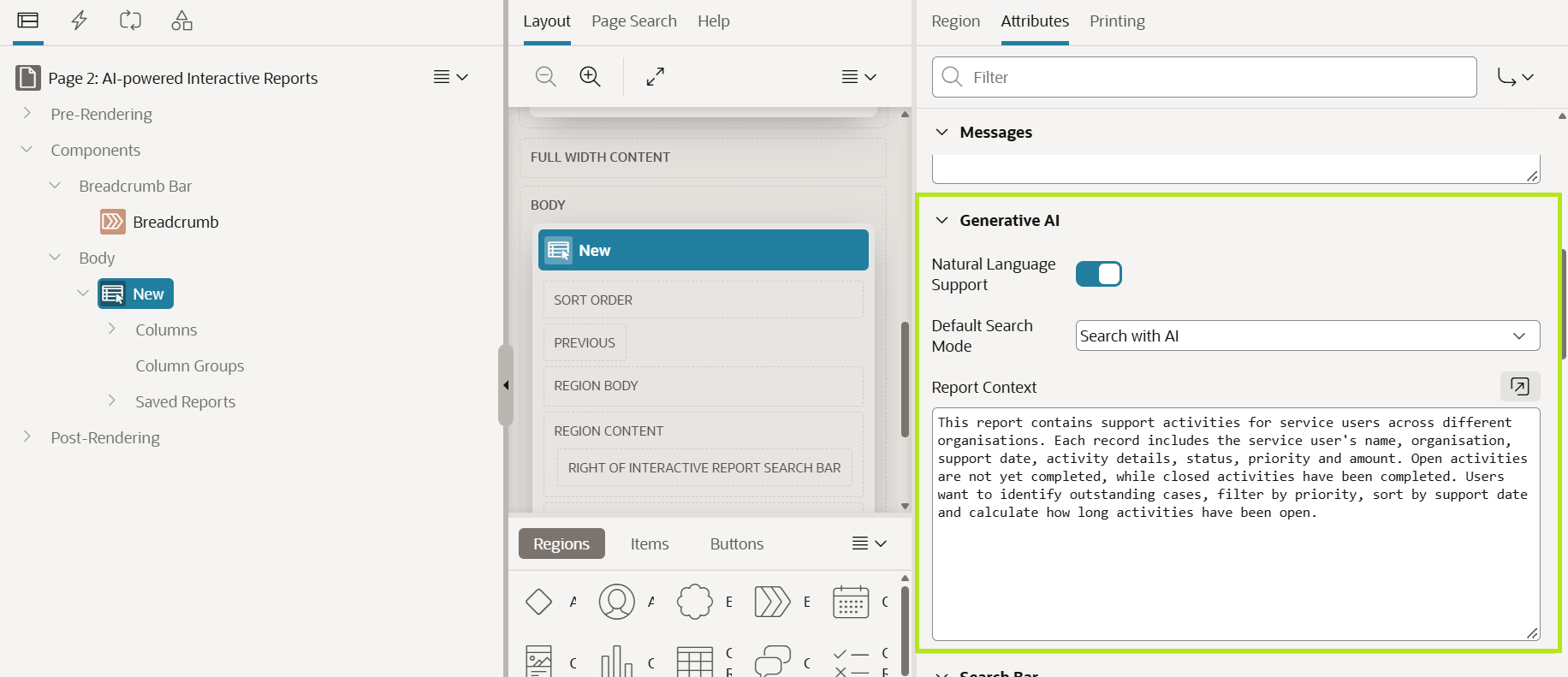
A scenario: A support manager needs answers without waiting for a developer.
Suppose your application stores support logs for service users. Every week, a manager needs to identify unresolved cases, find the oldest outstanding items, and calculate the number of days each case has been open.
Traditionally, the manager might ask a developer to create another report or manually adjust filters and calculations. With APEX 26.2, AI Interactive Reports can handle supported natural-language requests, including computed columns, without changing the underlying SQL query. Common commands can also be handled through configurable key phrases without requiring AI interpretation.
Two other changes are worth a look:
-
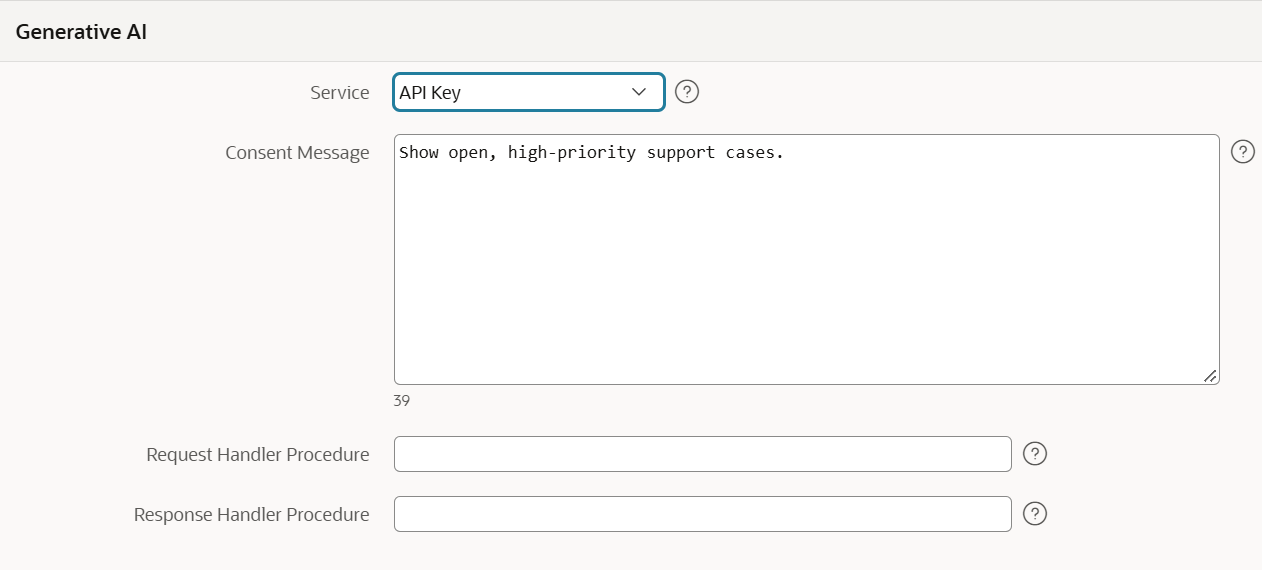
Newer provider APIs. Generative AI Services can now use OpenAI's Responses API, Google's Gemini Interactions API and supported OCI Generative AI models. You choose the provider API, and APEX handles the request format. If a newer model feature was the reason you held off, retest now.
-
Agents that link to pages. An answer can take the user straight to the right report or form. You define the allowed destinations and parameters, and APEX builds the final URL and checksum itself, so the model never handles session details. This lines up well with Session State Protection, which we cover in our APEX security checklist.
Interactive Reports: fewer trips to the model
A scenario: Imagine your Service User Management application is maintained by two developers.
-
Developer A updates the Service Users report to display a new Review Status column.
-
Developer B is working on a different page in the same application.
-
You want to import Developer A's change without unnecessarily importing the entire application.
In Oracle APEX 26.2, APEXlang file-level imports let developers import selected .apx files rather than always importing the complete application export. This can help make development workflows more targeted, although dependencies and deployment testing still matter.
NOTE: This demonstration requires SQLcl or the SQL Developer extension for VS Code connected to an Oracle APEX 26.2 environment. You cannot perform file-level imports directly through App Builder.
Data security that holds when an AI agent asks the question
A scenario: Regional sales managers should only see customers in their own region. Today that rule usually lives in APEX authorisation and then gets repeated in report queries, REST endpoints and, increasingly, the SQL behind AI agent tools. Every copy is another place to get it wrong.
With Deep Data Security, APEX passes the verified end-user identity to the database. The database then applies Data Roles and Data Grants to the SQL, down to row, column and individual value level. SQL run by supported agent tools executes as the requesting user, so a manager asking an agent to "show me all customers" only gets what their grants allow.
This complements APEX authorisation rather than replacing it. APEX decides what a user can do in the application; the database decides what data the SQL can touch. Deep Data Security is a feature of Oracle AI Database, so check your database version before building a plan around it.
Our view: Treat it as defence in depth. It will not fix a poorly designed application, but it is the right answer to the question "what stops an AI agent from retrieving something the user should not see?"
One less secret to look after
Web Credentials can now reference DBMS_CLOUD credentials that use OCI native authentication, including Resource Principal and Database Tools Identity. Picture an app that uploads documents to OCI Object Storage. Until now, that usually meant a person's API private key sitting in a Web Credential, which someone has to rotate and which leaves the company when they do. With a managed identity, an OCI IAM policy grants the access and, on Autonomous Database, OCI looks after the credential rotation.
Your upgrade test plan
The release notes list various changed behaviours. Run these in a cloned development environment before touching production.
| Area | What changed | What to test |
| Interactive Reports | Search bar changes, substitutions in report settings, raw JSON support for report queries | Custom CSS and JavaScript, saved reports, subscriptions, downloads |
| Static IDs | Static ID changes | Any JavaScript or CSS that targets element IDs |
| REST and OAuth | Tighter handling of scopes and tokens, new Enable RESTful Services instance setting | Every REST Data Source and any client calling your endpoints |
| Compatibility Mode | Behaviour changes across 24.2, 26.1 and 26.2 modes | Apps after changing mode, one at a time |
| Network access | Stronger network access controls | Outbound REST calls and email |
| Export and CI | Export wizard changes, translation data in the APEXlang export | Existing export and deployment scripts |
| Deprecations | Some Object Browser features and APEX item markup | Anything in your estate that still depends on them |
Timing: 26.2 is supported until April 2028. For comparison, 24.1 reaches end of support in December 2026, 24.2 in July 2027 and 26.1 in November 2027. If you are still on 24.1, the clock is already ticking. Find out more about APEX support dates in our guide.
Conclusion
APEX 26.2 does not rewrite the platform, but it removes friction where teams feel it: smaller, safer changes in source control, more control over AI cost and depth, and data rules that hold wherever the query comes from. Start with a development copy, work through the test plan above, and choose one feature to pilot rather than adopting everything at once.
If you would like help planning an upgrade or introducing APEXlang into your delivery process, get in touch with the team at DSP.