

- Services

Getting to know us
- Industries
Recent case study:
Oracle EBS Cloud Deployment
Consolidating and Migrating assets into Oracle Cloud Infrastructure.
.png?width=250&name=stonewater-logo%20(1).png)
Most Visited Pages
-
- Resources
DSP-Explorer acquires leading Oracle Applications Managed Services Provider, Claremont, to further extend its data management capabilities.

Resources
- Contact us
Beyond Dashboards: Building Dynamic Apps With Embedded Power BI
Contents
Discover how Embedded Power BI can take your reporting to the next level by integrating it into your dynamic applications.
Introduction to Embedded Power BI
Embedded Power BI enables developers to integrate interactive reports, dashboards, and data visualisations directly into their web or mobile applications. This seamless integration allows users to access and interact with data without leaving the app environment, creating a more fluid and intuitive user experience.
By embedding Power BI into your applications, you can deliver tailored, dynamic insights directly to end users, from internal employees to external customers, all without requiring them to log into the Power BI platform separately. It opens up a world of possibilities for delivering real-time, actionable insights exactly where they're needed.
Leveraging Embedded Power BI for Internal and External Sharing
Embedded Power BI allows organisations to securely share BI content both internally and externally:
- Internal Sharing:
Use Embedded Power BI to provide employees with secure, real-time access to the latest reports and dashboards. This enables them to make informed decisions based on up-to-date information and reduces the need to switch between platforms. - External Sharing:
You can embed Power BI reports in customer or partner-facing applications, enabling clients to interact with their data directly in a secure format. This can be particularly useful for businesses that want to provide self-service analytics to their customers, enabling them to explore data and gain insights on their own.
In both scenarios, embedded reports can be customised to match your branding and user interface, delivering a consistent and professional look and feel across platforms.
Power BI Service vs Embedded Power BI
While both Power BI Service and Embedded Power BI offer advanced analytics and visualisation capabilities, they serve different use cases:
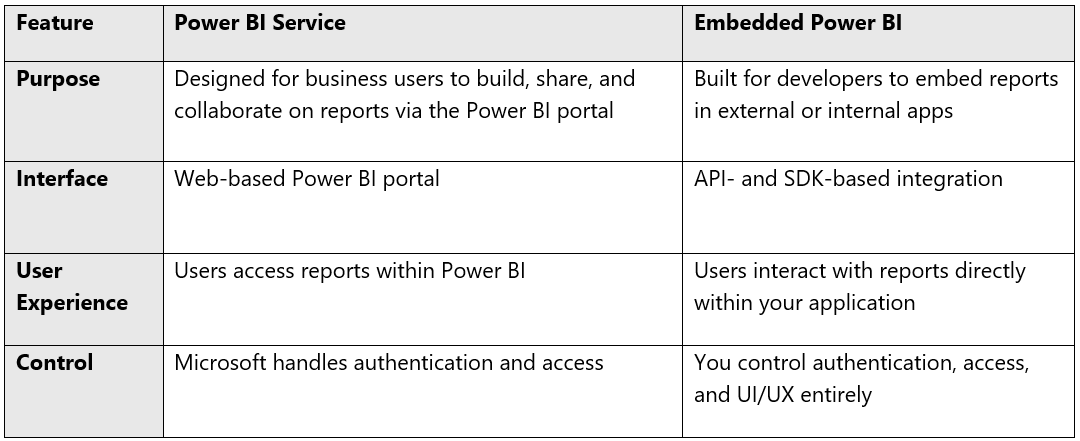
Overall, the Power BI service is suitable for users who want to create and consume reports within the Power BI ecosystem. Embedded Power BI is more suitable for developers who want to build custom applications with embedded BI functionality.
Supported SDKs and Programming Languages
Embedded Power BI supports a variety of SDKs and programming languages, making it flexible and accessible for developers. Some of the supported SDKs include:
- JavaScript SDK: Embed reports and dashboards into your web applications using JavaScript.
- .NET SDK: Provides a set of .NET libraries that enable you to programmatically create, access, and manage Power BI reports and dashboards.
- REST API: Interact with Power BI resources using HTTP requests. It provides a wide range of capabilities for embedding Power BI content into your applications.
In addition to these SDKs, Embedded Power BI also supports programming languages such as C#, Python, and Node.js through the REST API. While Java is also supported via the REST API, no dedicated Java SDK exists. This ensures developers can use their preferred language and development environment to integrate Power BI into their applications.
Security Considerations
Security is a cornerstone of any Embedded Power BI implementation. Key considerations include:
- Authentication & Authorisation:
Authenticate users through Azure Active Directory (AAD), Azure AD B2C, or custom identity providers. Embedded Power BI allows for "app owns data" and "user owns data" models, depending on your security and UX requirements. - Row-Level Security (RLS):
Enforce fine-grained data access by implementing RLS, ensuring users only see the data they're authorised to view. - Token-Based Access Control:
Embed tokens (e.g., Azure AD or embed tokens) provide secure, short-term access to embedded content without exposing credentials.
Ensuring secure access to embedded analytics helps you maintain compliance with data protection standards while offering personalised data experiences.
Licensing Requirements
Licensing for Embedded Power BI differs from standard Power BI Service plans. Key points:
- Power BI Embedded (Azure):
Ideal for ISVs and app developers. You pay for dedicated capacity (A SKUs) through Azure, based on compute usage. This model supports the “app owns data” scenario. - Power BI Premium (P SKUs):
Designed for larger organisations, Premium offers additional features like higher capacity, paginated reports, and on-prem report server. Premium can also support embedding in some cases. - Per-User Licensing:
If embedding in an internal app without Premium or Embedded capacity, each internal user consuming reports requires a Power BI Pro license. With Premium or Embedded capacity, internal viewers don’t need a Pro license, but content creators still do.
Choosing the right license depends on your user base, embedding scenario, and expected report usage.
Conclusion
Overall, Embedded Power BI unlocks a new level of data visualisation and analysis within your applications. It empowers businesses to share real-time insights securely with both internal teams and external customers, fostering data-driven decision-making across the board. With its flexibility, robust security options, and wide range of supported languages, Embedded Power BI presents a powerful solution for developers to seamlessly integrate BI functionalities into their applications and transform the user experience.
If you're ready to take your BI reporting to the next level, find out more on our Power BI Services page or get in touch with one of our experts today.